How to Get Your Team Using AI Agents: a 30-Day Pilot Plan

You gave your company access to an AI assistant, and a few people use it every day. Most others tried it once, got a so-so answer and went back to their old way of working. Moving a whole team from chatting with AI to letting an AI agent do the work (open the files, write the document, finish the task) is not a matter of buying more seats. It takes a plan, someone to help, and a way to see whether it is working. Teamcall is that plan, in a form you can run. It is a free, open-source plugin for Claude Code, Anthropic's AI assistant that works with the files on your computer.
Who it is for
Teamcall is for the person in a company who brings colleagues onto AI agents: an IT lead, an operations manager, a founder, or the one colleague everyone already asks. You say what you want in plain words, such as "we want to bring our five marketers onto Claude Code" or "write the pilot charter", and it writes the documents.
What it gives you
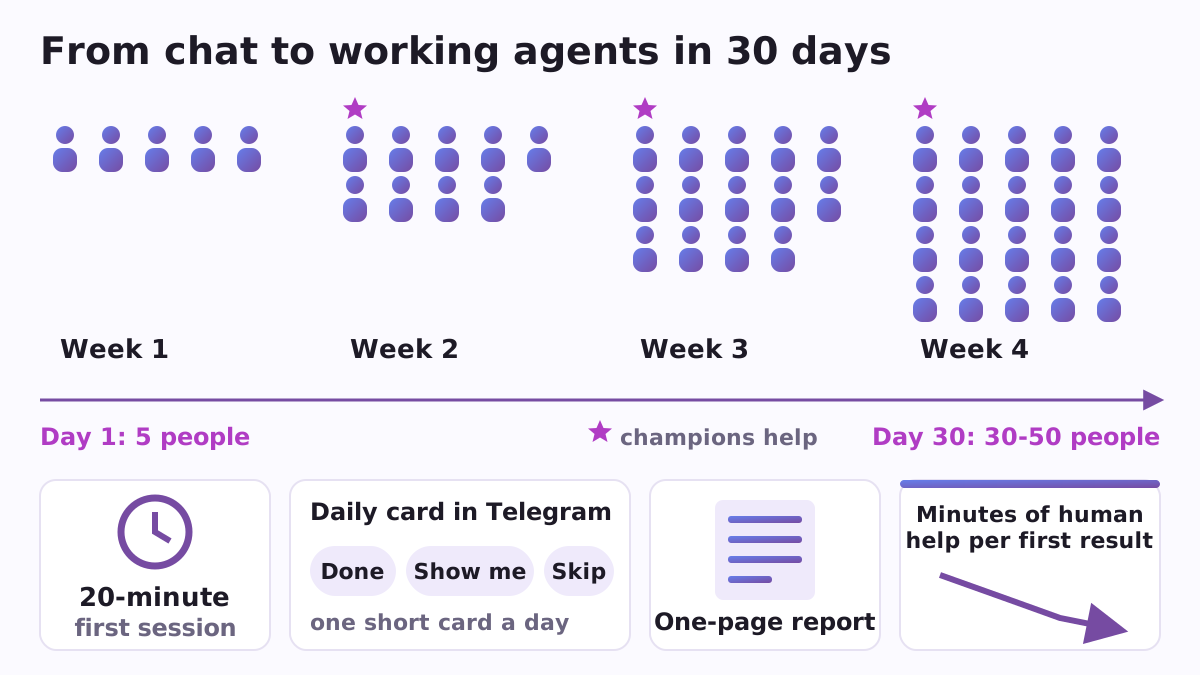
- A pilot charter. Five people to start, growing to 30-50 through champions, week by week. It sets the aim (three working results out of five), the one number to watch (minutes of human help per successful first result) and six measurements. It also writes a one-page note for IT: devices, accounts, data, folders, review, how to install and remove, who to contact.
- A 20-minute card for one person. Install, sign in with the work account, do one real task with a plan first, keep a short rules file (CLAUDE.md, at most 100 lines), then run the same task again as one command.
- A 5-hour path for the champion. The person who will help about eight colleagues learns plan mode and permissions, the team's rules file, the company's own skills, a second opinion from another AI, the phone remote, and how to unblock people.
- One command for a weekly task. Something a person already does by hand in the chat app is done once with the agent and saved as a command they can run again, or on a schedule.
- A daily card in Telegram or WhatsApp. Each working day one short card arrives from your company's own bot, teaching how to lead an agent and approve its steps: 20 cards over four weeks. Under each are three buttons: Done, Show me (the bot answers with the exact words to type) and Skip. The employee installs nothing, and a person who joins late still starts at card 1.
- A journal and a report. Each person's stage, minutes, help needed and blocker go into a simple file in your folder. The report shows where everyone is, with names replaced by P1, P2 and so on, and measures time, quality, coverage, repeatability, new capability and what a person still checks by hand.
- A decision page. From the journal alone it says one of three things: scale to the next wave, fix and repeat, or stop and change the route.
It also lists which subscription you already pay for covers which terminal agent: Claude Code, Codex CLI, Antigravity, Copilot CLI, Grok Build, Cursor and others. It plans and counts; it never buys anything. Cards and files come in English, Spanish, Portuguese, Russian and Ukrainian.
A concrete example
A small agency has five marketers who use a chat assistant now and then. The team lead says "write the pilot charter" and gets a four-week plan with five people in week 1. Each marketer takes the 20-minute card and picks something real, such as turning the weekly client report into one command. The lead's keenest colleague takes the champion path. Every morning a card shows up in Telegram. At the end of the month the report shows how many people got a first working result and how many minutes of help it took, and the decision page says whether to grow to the next wave.
How to start
You need Claude Code and Python 3.8 or newer. In Claude Code, add the Poly A1 catalogue and install the plugin:
/plugin marketplace add https://raw.githubusercontent.com/vadimchernets/poly-a1-plugins/main/.claude-plugin/marketplace.json
/plugin install teamcall@poly-a1
Then say what you want. Everything stays on your computer, except the daily cards, which your own bot sends through Telegram or WhatsApp with the bot's token (the password the messenger gives your bot). Teamcall comes with tests and is released under the Apache-2.0 licence. The repository, with the full list of commands, is at github.com/vadimchernets/teamcall.
Works with the other company plugins
Teamcall reads the company policy file that Firmcall writes, so the folders that stay on the computer and the approved vendors appear in the IT page without being typed twice. Seats are counted with Billcall. All of them install from the Poly A1 plugins catalogue.
Vadym Chernets also builds Poly A1, an app in which AIs from different companies check each other's work.