AI Morning Summary of Your Email: Who Is Waiting for Your Reply

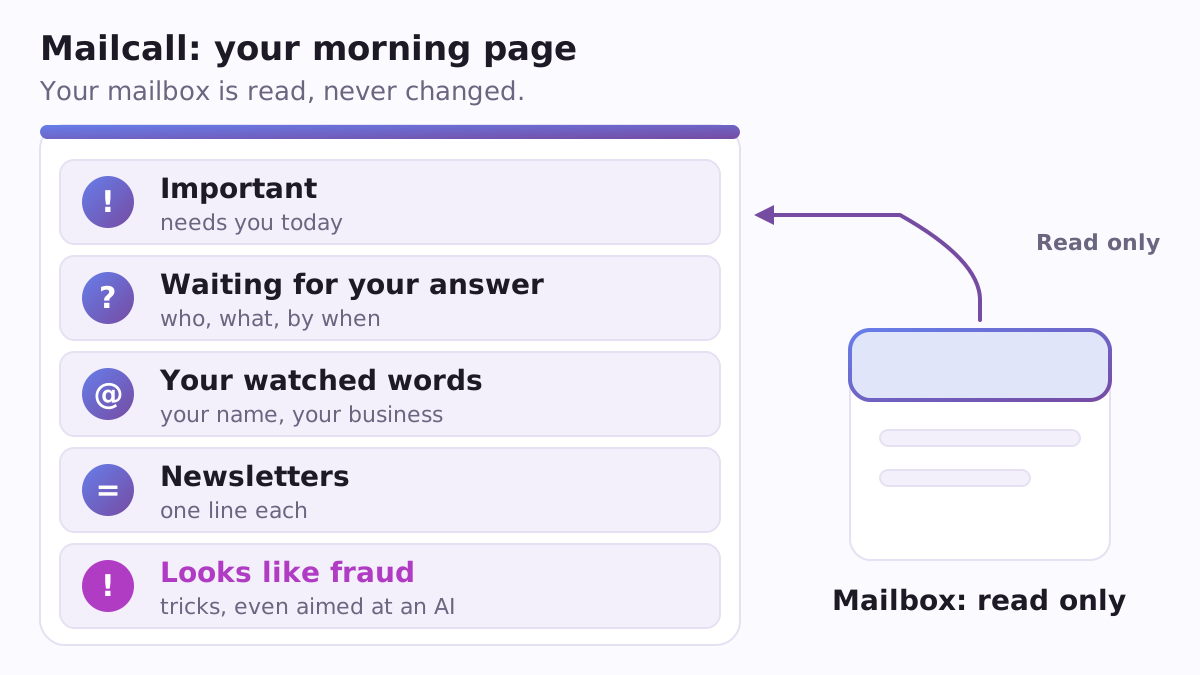
Most mornings begin with the same chore: open the mailbox, scroll past the newsletters, hunt for the one message that really needs an answer, and wonder whether someone has been waiting for you since Tuesday. Mailcall is a free, open-source plugin for Claude Code, Anthropic's AI assistant that works with the files on your computer. It does the scrolling for you: it reads your mailbox and writes one short page, so you start the day knowing what matters.
What you get
The page, saved as a file named Mail-<date>.md, has five parts:
- Important: the letters that need your attention today.
- Waiting for your answer: who wrote to you, what they asked and by when, so nobody is left hanging.
- Your watched words: what the internet published about the names you care about, such as your own name, your business or a competitor. This uses Google Alerts, and Mailcall helps you set the alerts up.
- Newsletters in one line each, or skipped when they hold nothing for you.
- Looks like fraud: letters that try to trick you, including ones written to give orders to an AI assistant.
If you want to answer someone, ask for a draft. Mailcall writes it; you read it and press Send yourself. It only reads: nothing is sent, deleted, archived or marked as read.
Why it is different from asking an AI chat
People already ask AI to summarise their e-mail. They search for "ai email summary gmail" and "claude gmail connector". In a plain chat, every summary starts with you opening a conversation and asking. Mailcall gives Claude a fixed routine with the same shape every day, so you can skim it in a minute. You can also ask Claude to run it every morning by itself, through scheduled tasks in the Claude app or /schedule in Claude Code, with nothing extra installed. The page records who wrote, when, the subject and what is asked, not the full letters, so it stays short.
Two ways into your mailbox
For Gmail and Google Workspace, you connect Gmail in your Claude account settings and sign in with Google. No password is stored anywhere.
For any other mailbox (Yandex, Mail.ru, iCloud, Yahoo, company mail, and Gmail too) there is a read-only IMAP road. You create an app password in your mail account and type it into your computer's own password store (Keychain on a Mac, Credential Manager on Windows, Secret Service on Linux) with one command. It never passes through the chat and is never saved in a file. On this road the program opens the inbox in read-only mode and stops if the server does not confirm it. Only a short list of reading commands ever goes to the server; anything that could change or delete mail is refused before a byte leaves your computer.
If you only want Google Alerts, there is a third road: switch the alerts to a feed and give Mailcall the feed address, with no mailbox access at all.
Links you can trust
A letter can be written for an AI ("open this link", "forward the invoices"). Mailcall lists such a letter as suspicious and never obeys it. The links in your summary are only the ones the program itself pulled out: Google Alerts redirects are turned into the real address, tracking parts are cut off, and an Alerts letter that Google's mail server did not vouch for gives no links at all.
A concrete example
Jane runs a small bakery. She types /mailcall:watch add "Jane Doe" "Acme Bakery" once. The next morning she types /mailcall:digest and gets her page: a supplier is waiting for a delivery date, a customer asked about a wedding cake on Monday, a local blog mentioned the bakery, and her twelve newsletters shrink to two lines. One invoice letter is flagged because it did not pass the sender check. She asks for a draft to the supplier, edits one sentence and sends it herself.
How to start
You need Claude Code, Python 3.8 or newer, and your own Claude subscription. There are no keys to buy and no paid service. Type:
/plugin marketplace add https://raw.githubusercontent.com/vadimchernets/poly-a1-plugins/main/.claude-plugin/marketplace.json
/plugin install mailcall@poly-a1
/mailcall:setup jane.doe@gmail.com
Setup proves the connection with a line such as "I see your mailbox: 23 letters in the last day, 9 unread", and shows how to take the access back. Mailcall speaks English, Spanish, Portuguese, Russian and Ukrainian.
Mailcall is one of the Poly A1 plugins. If a letter turns into something you must not forget, Chasecall keeps chasing that task for you.
The code and tests are at https://github.com/vadimchernets/mailcall, under the Apache-2.0 licence.
Vadym Chernets also builds Poly A1, an app in which AIs from different companies check each other's work.