Stop AI From Leaking API Keys, Card Numbers and Client Files

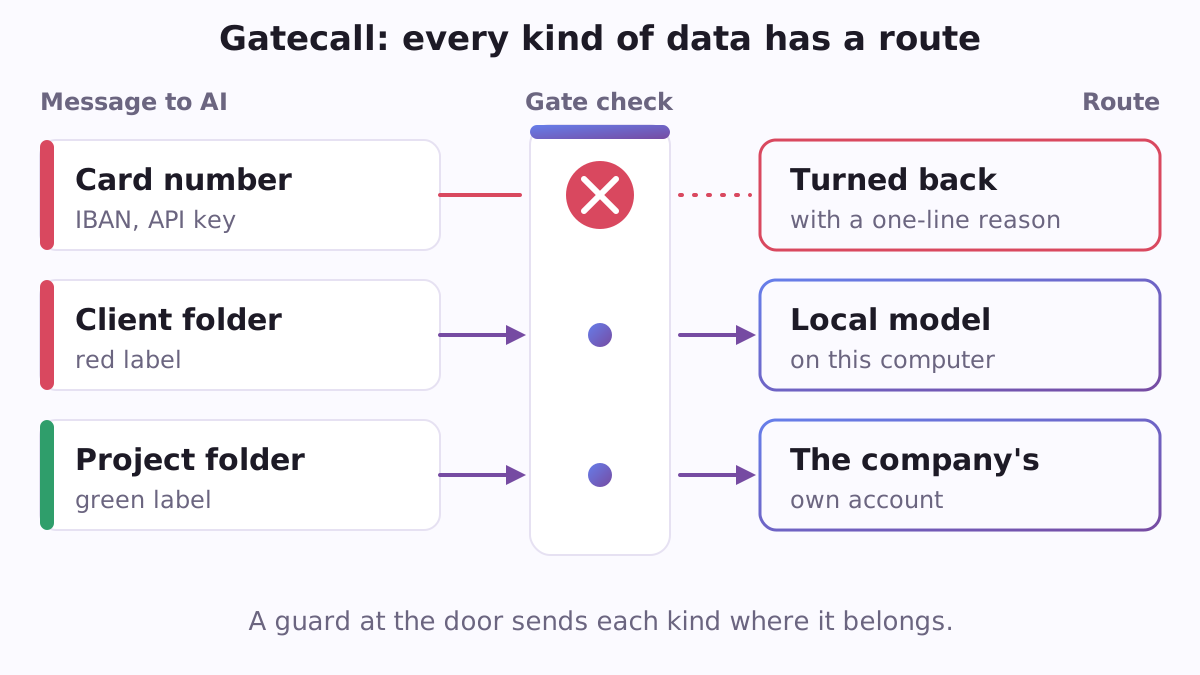
Most people use AI with a simple hope: that nothing they paste in will ever matter. Then a card number slips into a message, an API key (the secret password a program uses to reach a paid service) ends up in a command, or a whole spreadsheet of client addresses goes into a chat so that it can be "tidied up". Companies know this. Some ban AI altogether, which costs them the benefit. Others write a policy that nobody reads at the moment of pasting. Gatecall is a free, open-source plugin for Claude Code, Anthropic's AI assistant that works with the files on your computer. It puts the company's rule exactly where the mistake happens, and it gives people a way forward instead of only a "no".
Why you would want it
Claude Code can read files, run commands and call web tools on your computer. People who use it keep asking how to keep secrets out of a session, and a GitHub issue on the Claude Code repository describes secrets showing up even though the project's instructions told the assistant not to touch them. A written instruction is a request; a check that runs before the step is a lock. The best-known case outside coding is Samsung in 2023, where engineers pasted source code and a meeting transcript into a chatbot. Nobody meant harm. They were just working fast.
What it gives you
- A stop before the message leaves. Gatecall looks for API keys and tokens, card numbers (checked with the standard Luhn test, so ordinary long numbers pass), IBANs (checked with the mod-97 test), national ID numbers with their check digit (United States, United Kingdom, Spain, Portugal, Brazil, France, Italy, Germany, the Netherlands, Poland, Ukraine and Russia), and lists of e-mail addresses or phone numbers. If it finds one, the message is held and you are told why in plain words, in English, Spanish, Portuguese, Russian or Ukrainian.
- The same check on actions. Before the assistant runs a command, fetches a web page or calls a tool, the same look happens.
- Red, yellow and green folders. You say which folders hold what must stay in the company: client files, staff records, contracts. Red folders are read only by an AI model running on your own computer, in a session with no web tools and no network programs reaching outside. Yellow folders are work that may go to the company's own accounts, such as Claude Team or Enterprise seats. Everything else is green.
- Safe copies for other AI tools. Kimi can work in a training folder of practice files. Grok can work on a cleaned copy where keys, cards, IBANs, ID numbers and address lists inside every file, office documents included, are masked, so a card shows up as
[card ********7899]. - Ready company profiles. Pick
default,eu,us-federal-contractororus-dod-strict. A company can also close the AI services of particular countries or vendors with one line in its policy. - A journal for the security team. Every stop is recorded by kind and rule. The value itself is never stored: only a fingerprint made with the company's own key, so the same card coming back twice can be counted. Records are deleted after a retention period (90 days unless you choose another) and can be exported as a spreadsheet file.
A concrete example
An accountant at a small firm asks Claude to "check this list of clients and chase the late ones", and pastes a table with names, e-mail addresses and IBANs. With Gatecall installed the message does not go out. She sees one plain line: the text holds IBANs and a list of addresses. She then takes the route Gatecall points to: the clients folder is marked red, so a model on her own computer reads it, or she makes a cleaned copy in which the IBANs and addresses are masked. The work still gets done, and the bank details stay in the building.
How to start
You need Claude Code and Python 3.8 or newer. No account and no payment are needed; Gatecall itself sends nothing and buys nothing. In Claude Code, type:
/plugin marketplace add https://raw.githubusercontent.com/vadimchernets/poly-a1-plugins/main/.claude-plugin/marketplace.json
/plugin install gatecall@poly-a1
Then say "set up the data rules for our company". The assistant asks which folders are red and which are yellow, which country you are in, whether any countries or vendors are off limits, and how long to keep the journal. It writes a company-ai-policy.json file and the matching permission block for Claude Code.
Gatecall works with the other company plugins: Firmcall installs the same policy file on every laptop, Routecall opens the local-model window that may read red folders, and Billcall reads the same policy to count what AI costs. All of them are in the Poly A1 plugins catalogue.
The code, tests and full list of settings are at https://github.com/vadimchernets/gatecall, under the Apache-2.0 licence.
Vadym Chernets also builds Poly A1, an app in which AIs from different companies check each other's work.