Claude for Your Company: Your Own Plugin and the Same Rules on Every Laptop

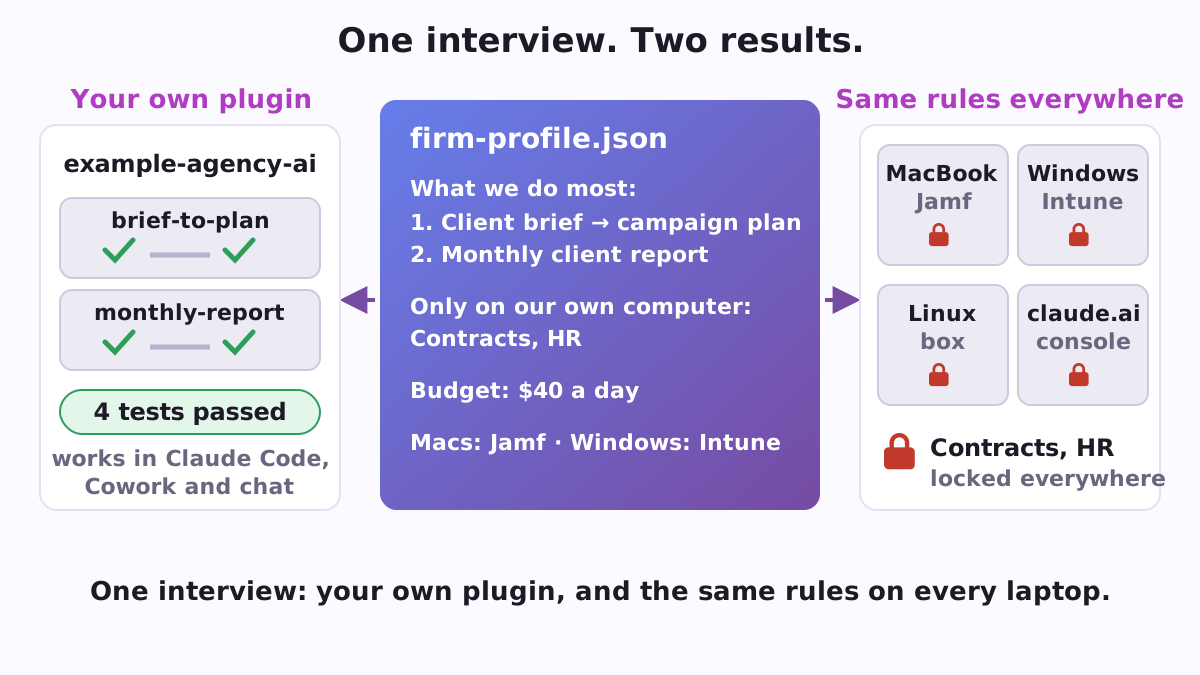
Firmcall helps the person who sets AI up in a company do two jobs at once. First, it turns the three to five things your people do most often, such as the first read of a contract, a monthly client report or a reply to a support ticket, into your company's own plugin for Claude: one skill per task, each with its steps, the checks a good result must pass and a real example, plus tests that keep those checks from getting lost. Second, it writes the rules every computer in the company should follow (which folders only a model on your own computer may read, which plugin catalogues people may install from) in each form an administrator needs: a file for one computer, a profile for Jamf, a script for Microsoft Intune and a copy for the claude.ai admin console.
Firmcall is a free, open-source plugin for Claude Code, Anthropic's AI assistant that works with the files on your computer. It writes and checks; it buys nothing. It needs no account, no card and no API key (the access code programs use to call an AI), and its script works offline.
Why a company needs both
People at work use AI whatever the policy says. In a June 2026 survey of 1,250 office workers at large companies in the US, the UK, Australia and Japan, two-thirds said they had used AI tools they believed company policy did not permit, while 86% worked where AI policies were in place (PagerDuty). A policy in a document doesn't reach the laptop. Claude Code, however, reads company rules that live on the computer itself. Anthropic calls them managed settings, and "no user, project, local, or --settings value overrides them" (Claude Code docs). Once someone writes them in the right forms and puts them in the right places, the same rules hold for everyone.
The other half is the work itself. Anthropic's open plugins for whole trades, such as knowledge-work-plugins, don't know how your agency writes a campaign plan. A skill does: a short instruction file Claude reads when the task comes up, written in your company's words. Firmcall keeps the skills and the rules in one profile, so both describe the same company.
A ten-minute interview
In Claude Code you say "make our company its own plugin", and Firmcall asks one question at a time, in plain words:
- What does the company do, and how many people work there? A ready template may fit: legal, finance, marketing agency, customer support or small business.
- Which three to five things do your people do most often? For each: the steps, what comes out, how a good result is recognised, and one real example.
- Which folders, such as contracts or HR, may be read only by a model running on your own computer?
- A daily or monthly AI budget, the team's language, Mac or Windows, Jamf or Intune.
- Which systems the agent should reach, such as a CRM or a database.
The answers go into one file, firm-profile.json. Firmcall reads the tasks back to you, then builds a folder called company-AI/ and checks it.
A worked example: a small agency
The repository comes with an example: a marketing agency with two frequent tasks, "Client brief to campaign plan" and "Monthly client report", two private folders (contracts and HR), a budget of $40 a day, a CRM, a Supabase database of sales leads, and Macs under Jamf next to Windows laptops under Intune. Built on 10 October 2026, it gave 20 files, among them:
- The agency's own plugin, one skill per task, with its checklist and examples, and four tests that all passed.
- A private catalogue to push to a private GitHub repository, so every computer installs and updates the plugin from one place.
- The plugin as a 3.7 KB zip for claude.ai's plugin library, where Cowork and chat use it.
- The rules for every computer, the same rules for the claude.ai console, a Jamf profile, an Intune script, an install script, and SQL for a read-only database role that shows each person only their own rows.
ROLLOUT.md: ten steps with the minutes each takes, 52 minutes in all, from making the catalogue a private repository to checking one computer with/status.
Each skill reads like a note to a new colleague. "Client brief to campaign plan" says: list what the client asks for, the deadline and the budget; write the plan; list every open question; and before handing it over, check that the deadline, the budget and the open questions are all there.
Lint: catch silent breaks before they reach everyone
Some settings break a company's setup without a word. lint reads any settings file or folder you already have and names them:
- The phone remote stops. Remote Control lets a person follow and steer a Claude Code session from the Claude app on a phone. The docs say it plainly: "If you set
CLAUDE_CODE_DISABLE_NONESSENTIAL_TRAFFICorDISABLE_GROWTHBOOK, Remote Control is unavailable" (Remote Control). People who set the first one to cut background traffic then go looking for what broke, as in the GitHub issue "Remote Control unavailable despite Pro plan authentication" (#28817). - One model endpoint for everyone.
ANTHROPIC_BASE_URLset for every session sends them all to another server, and those sessions stop fetching the console's rules. A cheaper model gets a window of its own instead, which Routecall sets up. - A path that points somewhere else: a rule written
Read(/Users/anna/...)with one slash is anchored at the settings file's folder, not the disk root. - Also: telemetry switches that turn the remote off under Trusted Devices, keys that work only in managed settings, and rules only the console carries.
A file on every computer, and the console too
Claude Code can take company rules from three places an administrator controls: the claude.ai admin console, a device-management policy (a macOS profile or a Windows registry value), and files in the computer's system folder. By default it uses the first that holds any rules and ignores the others (managed settings). One administrator of a managed Mac fleet found that a small baseline in the console "silently shadows our entire MDM policy" (issue #75149). Firmcall writes every copy whole, so whichever one a session reads carries all the company's rules, and check confirms that the Jamf profile and the Intune script carry them in full.
Each place reaches different sessions: cloud sessions read only the console, while a window on a local or cheaper model, and Cowork on the person's own computer, read the computer's copy. So Firmcall writes both. On the computer, Gatecall holds the private folders and opens them only to a model running on that same computer. In a live check recorded in the repository (2 October 2026), a stand-in local model asked to read a secret client file was refused with Firmcall's rules and let through without them.
Templates for five trades
init --template starts a new profile with two tasks for the trade and the open Anthropic plugins they build on:
| Template | Two starting tasks |
|---|---|
legal |
Contract first read; deadlines from a court letter |
finance |
Invoice check before payment; month-end close notes |
marketing-agency |
Client brief to campaign plan; a post in the client's voice |
customer-support |
Reply to a ticket; weekly themes from tickets |
small-business |
Quote from a customer request; the week on one page |
How to start
In Claude Code, add the Poly A1 catalogue by its link and install Firmcall; no git and no GitHub account are needed:
/plugin marketplace add https://raw.githubusercontent.com/vadimchernets/poly-a1-plugins/main/.claude-plugin/marketplace.json
/plugin install firmcall@poly-a1
Then say what you need in your own words: "make our company its own plugin" or "put the same rules on all our laptops". Firmcall writes the skills and ROLLOUT.md in English, Spanish, Portuguese, Russian or Ukrainian. It needs Python 3.8 or newer and works on Mac, Linux and Windows. Putting the rules on a computer takes an administrator about 2 minutes, once; Jamf or Intune uses the company's own console.
The script also runs on its own, without Claude Code:
git clone https://github.com/vadimchernets/firmcall
cd firmcall
python3 skills/firmcall/scripts/firmcall.py build data/examples/agency-10.json --out company-AI
python3 skills/firmcall/scripts/firmcall.py check company-AI
The code, the example agency, the templates and the tests are at github.com/vadimchernets/firmcall, under the Apache-2.0 licence.
Part of the company plugins
Firmcall writes one shared policy file (the private folders, the budget, the approved vendors) that the other company plugins read: Billcall, Gatecall, Routecall, Decidecall and Teamcall. All of them install from the Poly A1 plugins catalogue. Firmcall is written by Vadym Chernets and archived on Zenodo (DOI 10.5281/zenodo.23116718).
Vadym Chernets also builds Poly A1, an app in which AIs from different companies check each other's work.